01 / 12 · Scheduling and dispatch
See every technician's day, and change it with a drag.
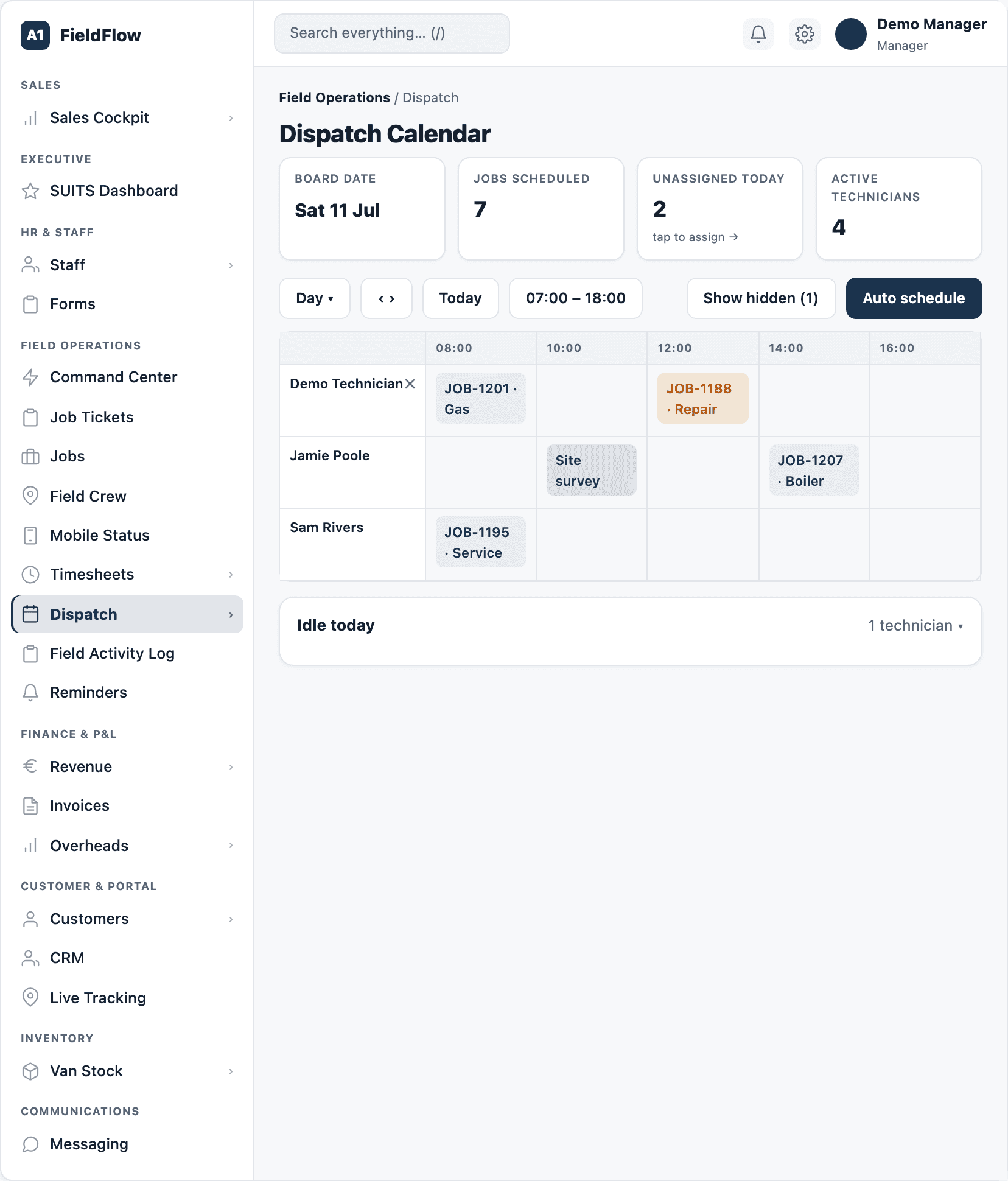
The dispatch board puts every technician, every job and every gap on one screen, live. Plan the week, react to the day, and let FieldFlow work out the drive times.
In detail
The dispatch board
- One lane per technician plus an unassigned lane, in a day view or a 15-day view.
- Drag and resize jobs in 15-minute steps; drop with Shift held to add a second technician.
- Estimated drive time and distance between each job.
- Clash warnings for overlaps, and running or finished jobs locked so nobody moves them by accident.
- Block out non-job time — training, office, van swap, collecting tools, personal — and an address on a block counts as a stop on the route.
- Updates live as the office and the field make changes.
Auto schedule
- One click previews a fixed-up day: later jobs move back so real drive time fits, with a 5-minute buffer.
- It only ever moves jobs later, never earlier, and warns about locked jobs and shifts that would overrun. Nothing changes until you apply it.
The Need Dispatch queue
- Every unassigned job in one list, including overdue ones, filtered by urgency and assigned with a click or a drag.
- Won sales deals arrive with the customer’s preferred date and time window.
- Site issues approved by a customer, and repairs approved through the KPA app, land here ready to schedule.
Multi-day and crew jobs
- Plan jobs of 2 to 15 working days that skip weekends and Irish public holidays.
- Set the crew and shift times per technician, per day. Reassign a day, change its times, cancel it, or add up to 60 more days.
- It stays one job with one invoice.
- On shared jobs each technician has their own status and signs off their own part; the job shows “2 of 3 signed off” and is done when everyone is.
Changes without chaos
- Moving a job someone is already working on creates a linked follow-up job instead, with a new window and crew — on a new charge or the same invoice, your choice.
- Moving a paused job lets you keep it paused or start it fresh.
- Every cancellation needs a reason, with an optional email to the customer.
Creating a job
- One page, no wizard: customer and site, description, documents up to 15 MB, priority and tags.
- Quick-pick times and durations, or switch to multi-day mode with per-person shifts.
- Optional risk assessment and asset registration for the technician to complete on site.
- Pricing with the Irish VAT rule applied automatically and a live margin badge that turns red when the job would earn too little.
- Send the customer a confirmation email as you save.
Finding any job
- Jobs list tabs for unassigned, unpaid, lost and today’s jobs, with a follow-up worklist and cancelled jobs.
- Search reaches into scope, notes, customer feedback, photo comments and site-issue reports.
- A quick-view drawer shows the crew and actual times, and sends a tracking link in one click.
- Job Tickets: a light register for call-outs and small repairs, from open to invoiced, paid or free of charge.
See your whole operation on one screen.
We walk through dispatch, the technician app and the profit on a job you have already done. Bring one real quote and one real day's schedule.
Book a demo